What is a "BLEED" and how do I set it up?
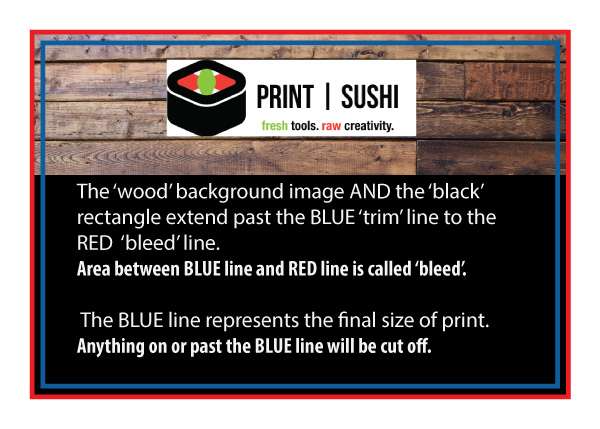
We require 'Bleed' for most products that we print. Bleed is the term for printing that goes right to the edge of the paper, with no 'white' around the edges. To make sure your image 'bleeds' all the way to the edge of the paper, you MUST design your job slightly LARGER than the final cut size. This will ensure that when we cut it, all color extends to the edges.
To create a bleed, create your document .125" larger on all four sides. That means that all images, boxes, and color will extend past the edge of your final printed document.
For example, artwork for a 4" x 6" postcard should be submitted as 4.25" x 6.25" - which is .125" (1/8") larger on each side (i.e. "BLEED"). If you do not want any white on your edges, all color should extend to the bleed line.
Visual demonstration below:
NOTE: larger format printing such as Banners, Canvas, Posters, Signs, Flags, etc. may require more than .125" bleed.
We encourage at least 1" bleed for these larger items. In the case of Mounted Canvas prints you will need 2" bleed, so your image will properly wrap around the the sides/back of your canvas print. Each product specifies in the product details what bleed is required.
Was this article helpful?
That’s Great!
Thank you for your feedback
Sorry! We couldn't be helpful
Thank you for your feedback
Feedback sent
We appreciate your effort and will try to fix the article